Design - Pipeline
October 5, 2026
Last updated on October 27, 2026
OneMore does a surprising amount of work when you are not asking it to. It keeps favorites pointing at the right pages after a notebook is moved or renamed, it watches for hashtags, and it can keep a full-text index current. None of that is triggered by a button; it happens quietly in the background while you work in OneNote.
The Pipeline is the small piece of infrastructure that hosts all of that work. It decides when background work runs, in what order, and what happens when something goes wrong. It knows nothing about hashtags or favorites. This article describes the pipeline itself. The services it hosts are described elsewhere.
Why a pipeline
Background features share the same few problems, and they are easy to get wrong when each one solves them alone:
- OneNote is slow to answer COM calls, so reading the same hierarchy or the same page once per feature is wasteful.
- Features depend on each other. Anything that needs to know "which page is this now?" should be told, not work it out again for itself.
- Every feature needs answers for error handling, shutdown, and "what if the user turns me off?".
The pipeline solves them once, with one host and a shared contract. A feature becomes a stage, and the host runs the stages in a fixed order, over and over.
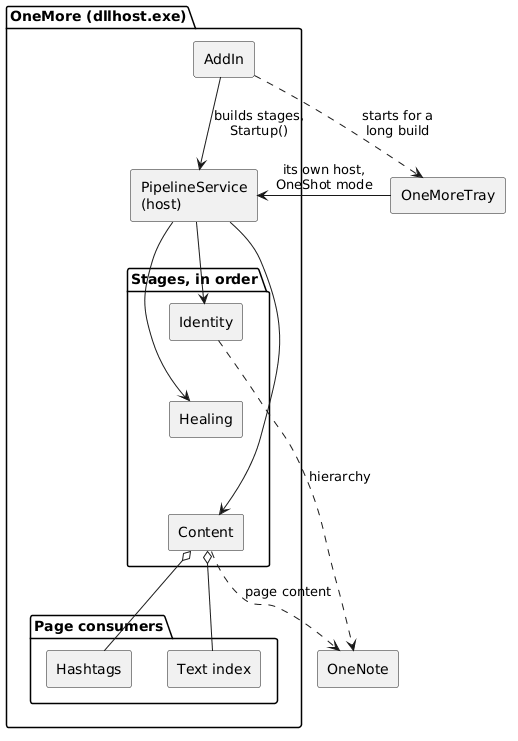
The big picture
|
OneMore Pipeline Overview (Extract) |
OneMore Pipeline Overview.puml (Refresh)
Three ideas carry the whole design:
- The host is generic. PipelineService runs a list of IPipelineStage objects. It owns the thread, the timing, cancellation, and the error policy. It has no idea what a stage does.
- Stages are ordered and cooperative. Earlier stages can hand data to later ones through a per-cycle PipelineContext.
- Expensive reads are shared. A stage that reads page content can serve several consumers from a single read of each page.
The host: PipelineService
PipelineService is a background task started once at add-in startup. After a short settling delay (three seconds, so OneMore finishes starting up before it competes for OneNote) it loops until the add-in shuts down:
- Run a cycle: visit every stage in order and run those that qualify.
- Work out how long to sleep.
- Sleep, then repeat.
It runs on the thread pool, is cancelled when the application exits, and disposes every stage on the way out.
What a stage is
A stage describes itself; the host decides what to do with that description.
|
Member |
Meaning |
|
|
Short label for the log. |
|
|
Minimum milliseconds between runs of this stage. |
|
|
Should this stage run at all? Read every cycle. |
|
|
One-time preparation before the first cycle. |
|
|
Can it run right now? Asked just before each run. |
|
|
Do the work once. |
IsEnabled is read on every cycle rather than once at startup. That is what lets a user switch a feature off, or back on, without restarting OneNote.
What happens in a cycle
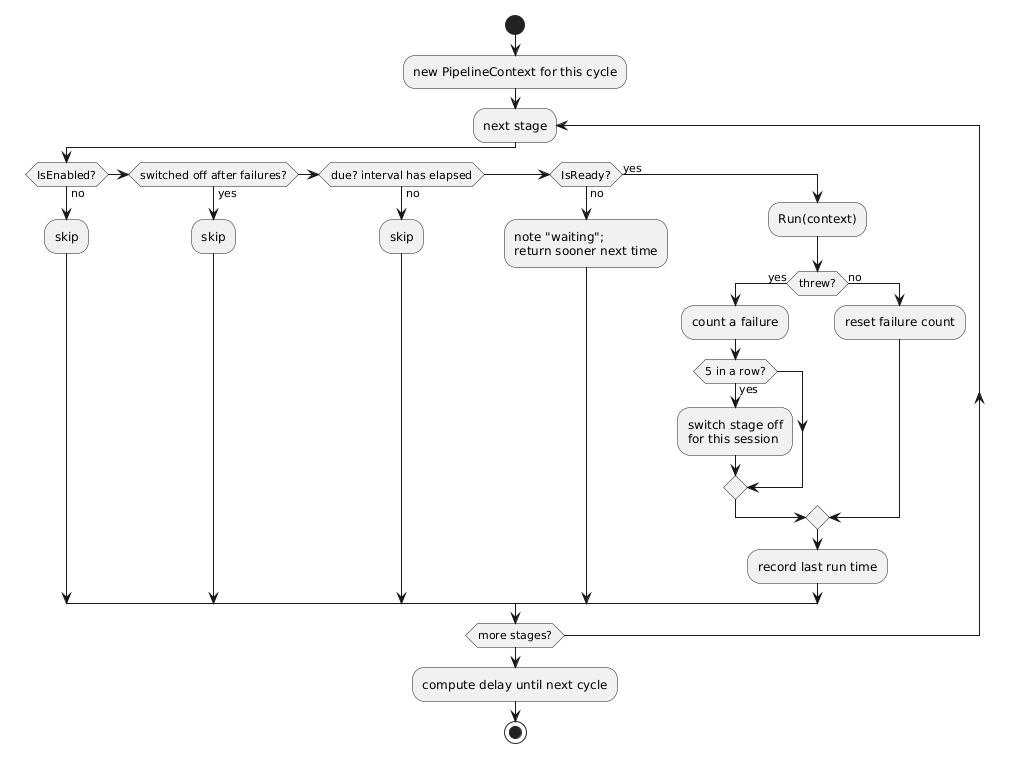
For each stage, in order, the host asks four questions. A stage must pass all four to run.
|
Stage Handling (Extract) |
Stage Handling PlantUML (Refresh)
A few details are worth calling out because they are the behavior you would otherwise have to discover by reading the code:
- Each stage keeps its own clock. The host wakes at the shortest interval among the stages that can run, but a stage only runs when its interval has elapsed. A slow stage never slows a fast one, and a fast cycle never forces a slow stage to run early.
- Not ready is not an error. A stage that is not ready is skipped for this cycle, without holding up the stages after it, and the host asks again soon (within ten seconds) rather than waiting out the stage's full interval.
- Failures are isolated. An exception in one stage is logged and does not stop the others. The failed stage is retried after its normal interval, not immediately. After five consecutive failures it is switched off for the rest of the session, and the log says so.
- No overlapping cycles. A re-entrancy guard makes sure a cycle that runs long is never joined by a second one.
- A floor on speed. No stage may be scheduled faster than once a second, whatever it asks for.
- Idle is cheap. If every stage is disabled, the host simply checks again every two minutes.
Sharing data between stages
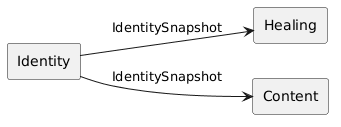
Stages run in order so that earlier stages can feed later ones. The vehicle is PipelineContext, a small type-keyed bag created fresh at the start of every cycle:
// an earlier stage publishes
context.Set(snapshot);
// a later stage looks for it
if (context.TryGet<IdentitySnapshot>(out var snapshot)) { ... }
Because a new context is created for every cycle, nothing leaks from one cycle into the next. A later stage must also tolerate the value being absent. If an earlier stage failed, or OneNote could not be read this time, the dependent stage simply has nothing to do and tries again next cycle.
The stages today
The add-in builds the pipeline with three stages. Order matters.
|
Stages (Extract) |
Stages PlantUML (Refresh)
|
Order |
Stage |
Role |
Needs a user setting? |
|
1 |
Identity |
Reads the notebook hierarchy and publishes an IdentitySnapshot: what every page is now. |
No |
|
2 |
Healing |
Uses the snapshot to repair favorites, layouts and the reading list after reopens, moves and renames. |
No |
|
3 |
Content |
Reads page content and hands it to consumers: hashtags and the text index. |
Yes, per consumer |
Two ordering decisions are deliberate:
- Identity is first because everything after it depends on its snapshot. It reads only the hierarchy, never page content, so it is cheap enough to run every couple of minutes.
- Healing is before Content so that a long content scan never delays it. Content can take a long time on a large set of notebooks; healing is quick and should not be stuck behind it.
Identity and Healing have no user setting. Favorites and layouts need to be correct even for a user who has turned hashtags off.
Sharing page reads: the content pass
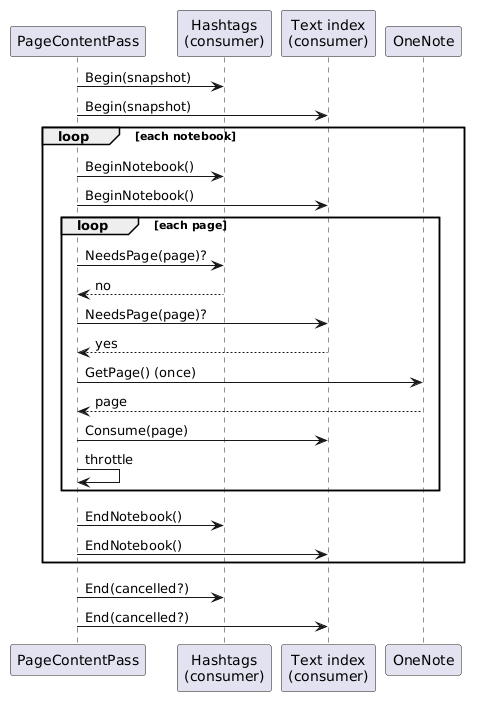
Reading a page from OneNote is by far the most expensive operation in the pipeline. The Content stage therefore does not scan pages itself. It delegates to a PageContentPass, which walks the pages of the snapshot and gives each page to every interested consumer (IPageConsumer), reading it from OneNote once, however many consumers want it.
|
Content Pass (Extract) |
Content Pass PlantUML (Refresh)
The shape of the contract is what makes the sharing safe and cheap:
- NeedsPage is a cheap decision made from the hierarchy alone. It must not load anything. A page that no consumer needs is never read and pays no throttle delay.
- Consumers are only handed pages they asked for. A page read for the text index is not pushed into the hashtag scanner.
- Consumers keep their own per-pass state between the lifecycle calls, and End tells them whether the pass was cut short so they do not record an incomplete pass as complete.
Being a good neighbor to OneNote
OneMore shares a process with the OneNote user interface, so background work must not make OneNote feel sluggish. The content pass owns the throttle:
- It waits a configurable delay after each page it actually reads, and spends that delay once per page, not once per consumer.
- A consumer can raise that floor with MinimumThrottle. For example, the text index asks for a minimum gap even if the user turned the throttle off, because a first full index can mean thousands of reads in a row.
- A consumer can also limit its own burst. The text index spends a time budget per pass and leaves the rest for the next one, so a large backlog is worked off over many cycles.
- When a foreground command is running, it holds a pause token, and the pass switches to a longer delay until the token is released.
- All delays honor cancellation, so shutting down OneNote never waits on a throttle.
Two hosts, two modes
The same PipelineService runs in two places, in two modes:
|
|
Add-in |
Tray |
|
Mode |
|
|
|
Stages |
Identity, Healing, Content |
Identity, Content |
|
Lifetime |
Cycles until OneNote closes. |
Runs each stage until it has succeeded once, then stops. |
|
Purpose |
Keep everything current. |
Do one long job, such as building the hashtag catalog from scratch. |
The tray exists because a first full build can take a long time and should not be tied to the OneNote process. The add-in's Content stage notices when the catalog needs building, asks the tray to start, and reports "not ready" until it finishes. Because the tray reuses the same host and the same stages, it gets the same scheduling, throttling and error behavior with no extra code.
Notice also that "not ready" is how the Content stage coordinates with the tray without blocking: a consumer that does not depend on the catalog, such as the text index, can still be served while the hashtag catalog is being built.
Designed for testing
Time and sleep are the hardest things to test in a scheduler, so the host takes both as injectable functions: a clock and a delay. Tests can run thousands of simulated cycles instantly, and assert on exactly which stage ran when. Likewise PageContentPass accepts its own page loader so consumers can be exercised without a running OneNote.
Adding a stage
Adding background work to OneMore is intended to be a small, local change:
- Implement IPipelineStage. Pick an Interval, decide what IsEnabled reads, and put the work in Run.
- If the work depends on the page list, read the IdentitySnapshot from the context and return quietly if it is absent.
- If the work needs page content, don't add a stage; implement IPageConsumer and add it to the Content stage so the page is read once for everyone.
- Add the stage to the list in the add-in's startup, in the position that satisfies what it depends on and what depends on it.
The stage never needs to think about threads, timers, cancellation, re-entrancy, shutdown, or how to survive its own bugs. That is the point of the pipeline.
Summary
- One host runs an ordered list of stages, continuously in the add-in and once through in the tray.
- Each stage owns its interval, its enabled state, and its readiness. The host owns everything else.
- Stages pass data forward through a per-cycle context, starting with the identity snapshot.
- Page reads, the costly step, are shared among consumers and throttled in one place.
- Failures are contained per stage and a persistently failing stage is retired, so background work can never take OneMore down.
#omwiki #omdeveloper #omdesign
© 2026 Steven M Cohn. All rights reserved.
Please consider a sponsorship or one-time donation to support ongoing development
Created with OneNote.